This guide describes how to ensure that the API operation's response contains a specific property with three different cases:
- Single response containing one property
- Multiple responses containing one property
- Multiple responses containing multiple properties
Let's get started!
- Use the openapi-starter repository to set up a basic project for use with this guide.
- Download the modified project files and use them to replace the corresponding files in the
openapifolder:
.
└── openapi
    ├── components
    │   └── responses
    │       ├── 200.yaml
    │       ├── 201.yaml
    │       └── 202.yaml
    └── paths
        ├── path-item-with-examples.yaml
        ├── path-item.yaml
        └── users_{username}.yaml
Make sure that the @redocly/cli has version 1.0.0-beta.99 or later
- If you're using VS Code as your favorite code editor, we recommend you install the Redocly OpenAPI VS Code extension.
This guide is most effective when you follow along and complete the steps.
After downloading the openapi-starter repository, ensure that you installed the project's dependencies via npm install.
Once completed, in the project folder, execute the npx redocly lint command. You should receive confirmation that the OpenAPI description is valid:
npx redocly lint

validating /openapi/openapi.yaml...
/openapi/openapi.yaml: validated in 39ms

Woohoo! Your API description is valid. 🎉
Now you are ready to configure the rules.
Imagine that your API description describes users' data, and it should have user_id as a part of all successful (200) responses. Let's define this.
- Open the
redocly.yamlin the project folder - After the line 9, add the rule configuration block:
rules:
  no-unused-components: error
  response-contains-property:
    severity: error
    names:
      200:
        - user_id
npx redocly lint

validating /openapi/openapi.yaml...
[1] openapi/components/responses/200.yaml:2:1 at #/properties

Response object must contain a top-level "user_id" property.

...

Error was generated by the response-contains-property rule.


[2] openapi/components/responses/200.yaml:2:1 at #/properties

Response object must contain a top-level "user_id" property.

...

Error was generated by the response-contains-property rule.


[3] openapi/components/responses/200.yaml:2:1 at #/properties

Response object must contain a top-level "user_id" property.

...

Error was generated by the response-contains-property rule.


/openapi/openapi.yaml: validated in 51ms

❌ Validation failed with 3 errors.
run `openapi lint --generate-ignore-file` to add all problems to the ignore file.
If you're using the Redocly OpenAPI extension for VS Code, this is how the lint errors look in the integrated terminal (Problems tab):

What does the lint output mean
As you can see from the output, the rule triggered an error in the 200.yaml file indicating there is no user_id property for 200 responses.
Three "copies" of the error mean that there are three $refs within the OpenAPI description that refer to the 200 response schema object.
When you want to check that your OpenAPI description contains property in all responses of a specific class, you can use ranges.
Let's modify the previous example to check that all 2xx responses contain the user_id property.
rules:
  no-unused-components: error
  response-contains-property:
    severity: error
    names:
      2xx:
        - user_id
npx redocly lint

validating /openapi/openapi.yaml...
[1] openapi/components/responses/200.yaml:2:1 at #/properties

Response object must contain a top-level "user_id" property.

...

Error was generated by the response-contains-property rule.


[2] openapi/components/responses/201.yaml:2:1 at #/properties

Response object must contain a top-level "user_id" property.

...

Error was generated by the response-contains-property rule.


[3] openapi/components/responses/202.yaml:2:1 at #/properties

Response object must contain a top-level "user_id" property.

...

Error was generated by the response-contains-property rule.


[4] openapi/components/responses/200.yaml:2:1 at #/properties

Response object must contain a top-level "user_id" property.

...

Error was generated by the response-contains-property rule.


[5] openapi/components/responses/200.yaml:2:1 at #/properties

Response object must contain a top-level "user_id" property.

...

Error was generated by the response-contains-property rule.


/openapi/openapi.yaml: validated in 71ms

❌ Validation failed with 5 errors.
run `openapi lint --generate-ignore-file` to add all problems to the ignore file.
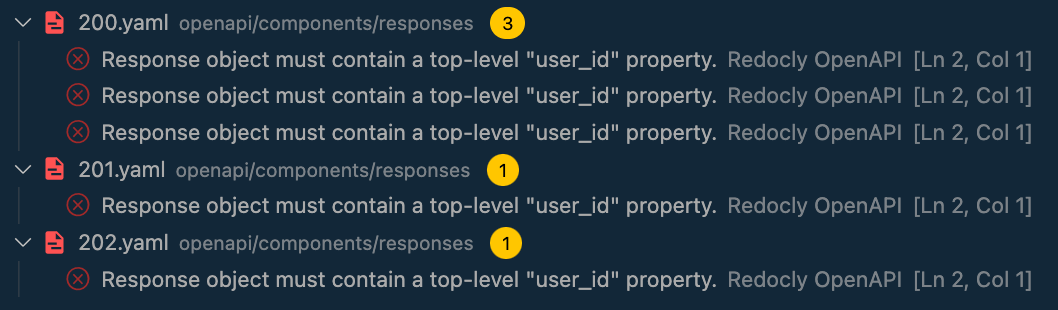
If you're using the Redocly OpenAPI extension for VS Code, this is how the lint errors look in the integrated terminal (Problems tab):
What does the lint output mean
There are three 2xx class responses defined for this guide, and you can see that the rule has successfully triggered errors with the missing user_id property for all of them.
Yet, three $refs within the OpenAPI description refer to the 200 response schema object and one $ref refers to each of the 201 and 202 responses, resulting in 5 errors in total
Imagine that your API evolves, and in addition to user_id for successful (200) responses, it should have created_at and ref_id properties for all other 2xx responses. Let's define this.
rules:
  no-unused-components: error
  response-contains-property:
    severity: error
    names:
      200:
        - user_id
      2xx:
        - created_at
        - ref_id
npx redocly lint

validating /openapi/openapi.yaml...
[1] openapi/components/responses/200.yaml:2:1 at #/properties

Response object must contain a top-level "user_id" property.

...

Error was generated by the response-contains-property rule.


[2] openapi/components/responses/201.yaml:2:1 at #/properties

Response object must contain a top-level "created_at" property.

...

Error was generated by the response-contains-property rule.


[3] openapi/components/responses/201.yaml:2:1 at #/properties

Response object must contain a top-level "ref_id" property.

...

Error was generated by the response-contains-property rule.


[4] openapi/components/responses/202.yaml:2:1 at #/properties

Response object must contain a top-level "created_at" property.

...

Error was generated by the response-contains-property rule.


[5] openapi/components/responses/202.yaml:2:1 at #/properties

Response object must contain a top-level "ref_id" property.

...

Error was generated by the response-contains-property rule.


[6] openapi/components/responses/200.yaml:2:1 at #/properties

Response object must contain a top-level "user_id" property.

...

Error was generated by the response-contains-property rule.


[7] openapi/components/responses/200.yaml:2:1 at #/properties

Response object must contain a top-level "user_id" property.

...

Error was generated by the response-contains-property rule.


/openapi/openapi.yaml: validated in 50ms

❌ Validation failed with 7 errors.
run `openapi lint --generate-ignore-file` to add all problems to the ignore file.
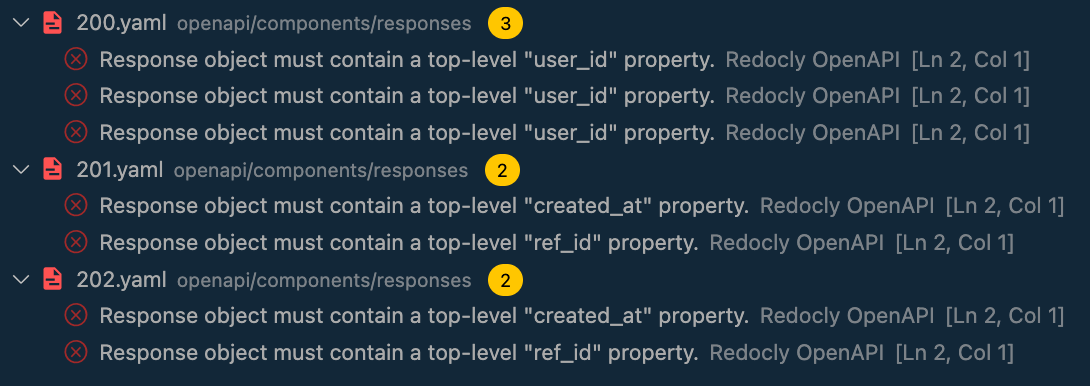
If you're using the Redocly OpenAPI extension for VS Code, this is how the lint errors look in the integrated terminal (Problems tab):
What does the lint output mean
In this example, as there are multiple properties to check within the same response class, the properties defined in a more specific status code take priority over the properties defined in a status code range.
As a result, the user_id is checked exclusively within the 200 status codes (that have three reference points), whereas created_at and ref_id are checked within the rest of the 2xx status codes (201 and 202, which have one reference point each), resulting in 7 errors in total.