To update your published project in Redocly, open a pull request to merge your development branch with the main branch.
Make sure you have the following:
Pull requests run checks to be sure you are not adding syntax issues or broken links to the production build. They also create a preview build. Other users get an opportunity to comment on the changes before they are merged with the main branch.
To open a draft pull request:
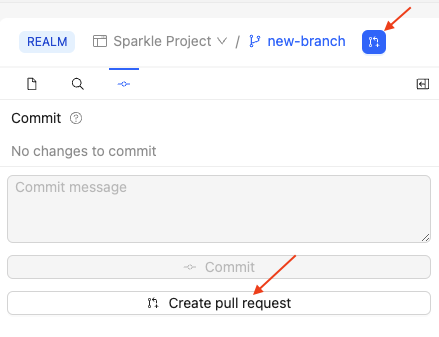
Click the Create pull request icon, or the Create pull request button on the Commit tab.
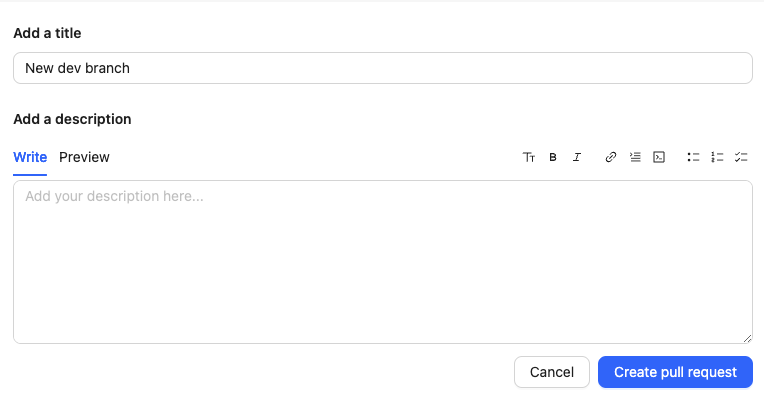
(Optional) In the page that opens:
- Edit the Title to your preference, By default, the Redocly platform uses the first commit message.
- Provide a short description for the pull request.
Click the Create pull request button.
After creating your draft pull request, you can continue committing changes to your branch until it is either closed or merged.
Before you merge your updates with the main branch, review them to be sure they contain what you expect.
When your changes are ready to be reviewed, update the pull request's state to Ready for review and assign reviewers. This notifies the team that there is a pull request awaiting their attention.
The reviewers approve the pull request if they agree that the changes are ready to merge. Once there are approving reviews, the pull request can be merged, bringing your changes into the main branch of the project.
You might no longer want to continue working on a pull request or have it merged with main. In that case, open the Actions menu and select Close pull request.
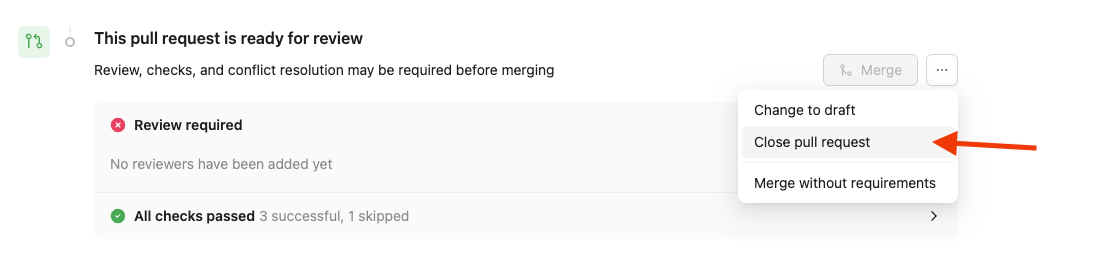
To reopen it later, select Reopen pull request from the same menu.

- Use the editor - Create and edit content in Markdown and Markdoc with Redocly's collaborative editing tools and syntax highlighting
- About Redocly platform - Explore the features and capabilities of Redocly, Redocly's collaborative content management platform
- Redocly platform configuration reference - Configure the platform deployment settings including options to publish builds with broken links or syntax issues