Every AI feature in Redocly, and which plan includes it
Redocly is the API platform for developers and AI agents. It documents OpenAPI, AsyncAPI, GraphQL, and SOAP APIs, with reference docs and a developer portal for people, an MCP server and llms.txt for agents, and AI that answers questions and reviews your docs. This page lists every AI capability we ship: what it does, who it is for, which plan includes it, and where its docs are.
Last updated: November 22, 2026. Also see everything we shipped for AI in 2026, our look back at the year.
On this page: Short answers · Features by plan · For your readers · For AI agents · For your docs team · Open-source CLI · By the numbers · Security and data · FAQ
- The AI Assistant and the MCP server are on every plan: Pro, Scale, and Enterprise. Neither is Enterprise-only.
- Scale adds the embeddable AI Assistant, custom MCP tools, and AI Assistant analytics. Enterprise adds MCP analytics and the Writer agent.
- AI features are included in beta with usage limits. Nothing AI-related appears on your invoice today.
- Answers come from your content. The assistant and the MCP server use retrieval-augmented generation over your published docs, with models hosted on AWS Bedrock and Google.
- The AI tooling in Redocly CLI is free and open source under the MIT license:
score,generate-client,generate-arazzoandgenerate-specwith AI, andintrospect-mcp.
Pro, Scale, and Enterprise all include unlimited seats, readers, and pages. Plan details and prices are on the pricing page.
| Feature | Pro | Scale | Enterprise | Status |
|---|---|---|---|---|
| AI for your readers | ||||
| AI Assistant in your docs | Yes | Yes | Yes | Beta, included with usage limits |
| Embeddable AI Assistant (web component) | No | Yes | Yes | Beta, included with usage limits |
| AI Assistant analytics | No | Yes | Yes | Available |
| AI for agents and AI clients | ||||
| MCP server | Yes | Yes | Yes | Beta, included with usage limits |
| Custom MCP tools | No | Yes | Yes | Beta, included with usage limits |
| MCP server analytics | No | No | Yes | Beta, included with usage limits |
| API calls through MCP | Yes | Yes | Yes | Early access |
| Agent skills | Yes | Yes | Yes | Available |
| llms.txt and Markdown versions of every page | Yes | Yes | Yes | Available |
| WebMCP tools | Yes | Yes | Yes | Available |
| Prompt tag and AI page actions | Yes | Yes | Yes | Available |
| AI for your docs team | ||||
| Reviewer agent | Yes | Yes | Yes | Beta, included with usage limits |
| Writer agent | No | No | Yes | Early access |
| Project initializer (Scaffold with AI) | Yes | Yes | Yes | Available |
| AI Assistant in the Redocly platform | Yes | Yes | Yes | Available |
| Free and open source: Redocly CLI | ||||
redocly score | Free | Free | Free | Experimental |
redocly generate-client | Free | Free | Free | Experimental |
generate-arazzo and generate-spec with AI | Free | Free | Free | Experimental |
redocly introspect-mcp | Free | Free | Free | Experimental |
| Redocly skills and MCP server for your AI client | Free | Free | Free | Available |
Readers ask a question and get an answer from your documentation, with links to the pages it came from. In your docs, and in your own app.
Answers reader questions inside your docs site from your own content, and links every answer to its source pages.
- For: readers of your public or login-protected docs, and docs teams that want fewer support tickets.
- Plans: Pro, Scale, and Enterprise. Each organization gets 3,500 questions a month.
- Status: beta, included with usage limits.
What it does:
- Readers select Ask AI or type into search, and get an answer written from your pages and API descriptions, with links to the sources it used.
- The assistant works as an agent: it searches your docs and reads your API descriptions with the same tools as the MCP server, so it looks up an endpoint instead of guessing.
- Access control applies to every answer: the assistant only retrieves content that the signed-in reader is allowed to see.
- Readers rate each answer. You can add a project prompt, restrict the assistant to teams, or turn it off with one option.
Docs: AI Assistant configuration · AI governance and security FAQ
Puts the same AI Assistant in your own web app, dashboard, or support portal with two lines of HTML.
- For: product teams that want answers where users get stuck, instead of in a separate docs tab.
- Plans: Scale and Enterprise.
- Status: beta, included with usage limits.
What it does:
- Add a script tag and a
<redocly-ai-assistant>element, and your app gets an Ask AI button. It answers from the docs you already publish: there is no second index or chatbot to train. - Answers cite their sources. It matches your colors, fonts, and light or dark mode, speaks 14 languages, and supports keyboard and screen reader use.
- Pass an identity token, and it also answers from the pages that signed-in user may read. Tell it the product and API version the user is on, and it answers only from those docs.
- It can send what the user sees in your app with each question, and asks for approval before it runs a tool that changes data.
- On Enterprise, support escalation adds a Contact support button that sends the user's request and the conversation to your support team by email. It can also offer support on its own when it cannot answer or the user asks for a person. The email uses the user's address as the reply-to, so it works with any help desk that creates tickets from email.
Docs: AI Assistant web component · Answer from login-protected content · Support escalation · Launch post with a live demo
Shows every question readers ask the assistant, the answer, the sources it used, and whether it found an answer.
- For: docs and support teams that need to find content gaps and prove the assistant works.
- Plans: Scale and Enterprise, as part of project analytics.
- Status: available.
What it does:
- Each conversation lists the question, the full answer, the source pages, the reader (or Anonymous), the date, and the reader's rating.
- Filter by question category, by whether an answer was found, and by the reader's team, then export to CSV. Unanswered questions show you which content is missing.
- This is how you test retrieval quality on your own content: ask the questions your users ask, then check the answers and sources here.
Docs: Analytics: AI Assistant
More and more API questions are asked in Claude, ChatGPT, Cursor, or Codex instead of in a browser. These features give those tools your documentation as the source, instead of leaving them to guess.
Every project serves an MCP server at /mcp that lets AI clients search your docs and read your API descriptions directly.
- For: developers who use AI coding tools against your API, and API teams that want those tools to answer from the docs.
- Plans: Pro, Scale, and Enterprise.
- Status: beta, included with usage limits.
What it does:
- Nothing to build or host. AI clients search your documentation, list your APIs, and read endpoints, parameters, security schemes, and full descriptions for OpenAPI and GraphQL, across every API version you document.
- Readers who open
/mcpin a browser get setup steps for Claude, Claude Code, ChatGPT, Codex, Cursor, VS Code, and Grok. - Login-protected docs stay protected: clients sign in with OAuth, and your access rules apply to every call. You can restrict the server to teams, or serve public pages without sign-in on a protected project.
- Supports the 2026-07-28 MCP protocol revision, standard tool annotations, and an MCP server card that agents and registries find with one request.
Docs: MCP server · Connect an AI client · Control access
Redocly hosts your own MCP tools on your project's MCP server, so AI agents can do what is specific to your product without you running a server.
- For: teams whose agents need product-specific actions or data, and that don't want to build and host their own MCP server.
- Plans: Scale and Enterprise.
- Status: beta, included with usage limits.
What it does: you add a tool as a TypeScript or JavaScript file in an @mcp folder in your project. Redocly runs it for you on your project's MCP server, next to the built-in documentation tools, so there is nothing to deploy or host.
Docs: Custom tools
Shows which AI clients call your MCP server, which tools they use, and how often.
- For: API and docs teams that want to know how agents use their documentation.
- Plans: Enterprise.
- Status: beta, included with usage limits.
What it does: requests, tool calls, top tools, and AI clients for each project, in sortable tables. Telemetry records tool names, durations, and client names, not prompt text or results.
Docs: Analytics: MCP server
Lets AI agents call the APIs you document, through your MCP server, with credentials the user supplies.
- For: API providers that want AI tools to integrate with their product, not only describe it.
- Plans: all plans; Redocly enables it for each organization.
- Status: early access, off by default.
What it does: agents stop just reading about your API and start calling it, with your documentation as the interface. Nothing is exposed until Redocly enables it for your organization and you turn it on.
Docs: AI governance FAQ
Publishes task instructions that agents load on demand, so they follow your steps instead of guessing from reference docs.
- For: teams with multi-step tasks, such as onboarding or migrations, that agents keep getting wrong.
- Plans: Pro, Scale, and Enterprise.
- Status: available.
What it does: you put skill files in an @skills folder. Agents get them as MCP resources and through an A2A agent card that describes what your project offers.
Docs: Agent skills
Generates an llms.txt file and a clean Markdown copy of every page, including API reference pages, for LLM tools to read.
- For: anyone who pastes docs into an AI tool, and teams whose custom components would otherwise be invisible to AI.
- Plans: Pro, Scale, and Enterprise.
- Status: available.
What it does:
- Each project gets an
llms.txtfile in the llmstxt.org format that links a Markdown version of each page. See redocly.com/llms.txt for a real one. - API reference pages include OpenAPI code samples and response samples, and render
oneOfand discriminator schemas correctly. - Readers can copy any page as Markdown, or open it in ChatGPT or Claude, from the page actions.
- Custom Markdoc tags control their own Markdown output, and the
visibilitytag targets content at humans or at agents.
Docs: llms.txt configuration · Customize how LLMs see your tags · Visibility tag
Gives the AI agent in the reader's own browser tools to search, read, and open your pages.
- For: readers who browse with an AI agent built into the browser.
- Plans: Pro, Scale, and Enterprise.
- Status: available.
What it does: browser agents use the tools your site publishes instead of scraping the page.
Docs: WebMCP tools
Lets readers send a page or a ready-made prompt to Claude, ChatGPT, or Cursor, or connect their AI client to your MCP server, in one click.
- For: docs teams that write tutorials meant to be run by an AI coding tool.
- Plans: Pro, Scale, and Enterprise.
- Status: available.
What it does:
- The
promptMarkdoc tag shows a prompt that readers copy, or open in Cursor, Claude, or ChatGPT. - The
connect-mcptag and the default page actions add your MCP server to Claude, VS Code, or Cursor, or copy its URL.
Docs: Prompt tag · Connect MCP tag · Page actions
Agents that work on your docs repository: one reviews every pull request, one turns reader signals into fixes, and one sets up a new project from a description.
Reviews every docs pull request as soon as it opens, and leaves line-level comments on API descriptions and documentation.
- For: teams that keep API descriptions and docs in Git, and want a first review before a human looks.
- Plans: Pro, Scale, and Enterprise.
- Status: beta, included with usage limits.
What it does:
- Checks OpenAPI 3.x, AsyncAPI, and JSON Schema for correctness and breaking changes; Markdown for clarity, and for accuracy against the API description it references; API security risks, framed by the OWASP API Security Top 10; consistency across related pages; and your Redocly configuration.
- Every comment has a severity. It reads the rule files your team keeps, such as
AGENTS.md,CLAUDE.md,.cursor/rules, or Copilot instructions, and re-checks its comments when you push a fix. - Posts inline comments, a summary at the top of the pull request, and a status check on GitHub, GitLab, Bitbucket, or Azure DevOps. It never blocks a merge.
More: Reviewer agent
Turns failed searches, unhelpful AI answers, page feedback, and support tickets into docs pull requests for your team to review.
- For: docs teams that cannot keep up with every signal their readers leave.
- Plans: Enterprise. Works with GitHub repositories during early access.
- Status: early access.
What it does:
- Each duty is one job: fill gaps that readers search for or ask the assistant about, fix what page feedback reports, add answers from closed support conversations, and follow up on review comments on its own pull requests.
- Scheduled duties audit page SEO, draft changelog entries, and translate changed pages.
- You can also define your own duties for jobs specific to your docs.
- It remembers what it has worked on and the review comments it received, so it doesn't repeat mistakes your reviewers already pointed out.
- Every pull request carries the evidence behind it and a fact check against your code. If there is no concrete gap, it does nothing.
More: Writer agent
Creates a first version of a new docs project from your description, the features you pick, and files and links you upload.
- For: teams starting a new docs site or moving from another tool.
- Plans: Pro, Scale, and Enterprise.
- Status: available.
What it does: you describe the project, pick features, and add your existing files and links, and you start from a working project instead of an empty repository.
Docs: AI governance FAQ
Answers questions about your own Redocly setup: plan, members, build logs, and project configuration.
- For: everyone who works in the Redocly platform.
- Plans: Pro, Scale, and Enterprise.
- Status: available.
What it does: ask "why did my build fail?" and get your build's answer, not a generic troubleshooting page. When a person is needed, it offers Contact support.
More: What we shipped in summer 2026
These commands ship in Redocly CLI under the MIT license. They run locally or in CI, and need no Redocly account or plan.
Grades how easily AI agents can call your API from its OpenAPI description, from 0 to 100, and names the operations to fix first.
- For: API designers who want agents to call their API correctly.
- Status: experimental.
What it does: static analysis with fixed rules, with no model, no API key, and no calls to your API. Ten subscores explain the grade, and it ranks the edits that would raise it most.
Example output for the Redocly Museum sample API, shortened:
$ npx @redocly/cli score openapi.yaml
Document: openapi.yaml score:

  Scores

  Agent Readiness:  89.8/100
  Reachable:        91.3/100 with every safe edit

  Subscores

  Parameter Simplicity     [█████████████████░░░] 86%
  Schema Simplicity        [████████████████░░░░] 81%
  Documentation Quality    [███████████████████░] 96%
  Constraint Clarity       [██████████████░░░░░░] 69%
  Example Coverage         [██████████████████░░] 88%
  Error Clarity            [████████████████████] 100%
  Dependency Clarity       [██████████████████░░] 88%
  Identifier Clarity       [████████████████████] 100%
  Polymorphism Clarity     [████████████████████] 100%
  Discoverability          [████████████████████] 99%

  Recommendations

   +5.3  Add constraints to schema properties (5 operations)
         Contract risk: add only the constraints the API already enforces.
   +0.5  Add descriptions to schema properties (2 operations)
   +0.5  Add response examples (1 operation)
More: score · Command reference
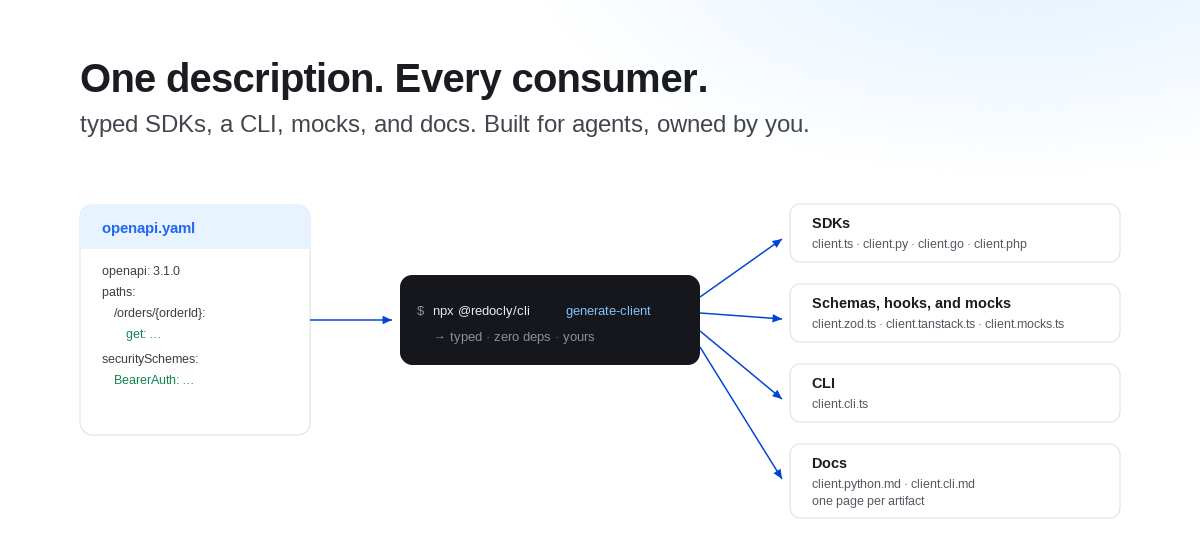
Generates typed SDKs and a CLI from an OpenAPI description, built so AI coding agents use them correctly.
- For: API providers who ship SDKs, and teams whose agents write API calls.
- Status: experimental. Hosted SDK generation and publishing in the Redocly platform is on Scale and Enterprise.
What it does: TypeScript, Python, Go, PHP, and Java clients, plus a ready-to-run CLI, validation schemas, query hooks, test mocks, and reference docs. No dependencies beyond each language's HTTP layer, and the generated code is yours outright.
$ npx @redocly/cli generate-client openapi.yaml --output src/client.ts

  Generating client for openapi...

Client successfully generated: 1 file (78794 bytes) at /home/you/museum/src/client.ts.
More: generate-client · Command reference
Uses the AI coding tool you already have to design realistic Arazzo workflows, or to refine an OpenAPI description inferred from traffic.
- For: API teams that need workflows or a first OpenAPI description quickly.
- Status: experimental.
What it does: both commands run your local claude, codex, or cursor CLI, with no API keys to configure. generate-spec only accepts an AI refinement that keeps the operation's path, method, and observed status codes and passes validation; otherwise it keeps the deterministic version.
npx @redocly/cli generate-arazzo openapi.yaml --with-ai --ai-provider claude
npx @redocly/cli generate-spec ./traffic.har --with-ai --ai-provider claude -o ./openapi.yaml
A shortened excerpt of a workflow that generate-arazzo --with-ai wrote for the Redocly Cafe API in a real run. The steps pass data to each other, such as the new menu item's ID:
workflows:
  - workflowId: manage-menu-items
    summary: Create, view, and remove menu items
    steps:
      - stepId: create-menu-item
        operationId: $sourceDescriptions.cafe.createMenuItem
        requestBody:
          contentType: multipart/form-data
          payload:
            name: Cappuccino
            price: 4500
            category: beverage
        successCriteria:
          - condition: $statusCode == 201
        outputs:
          menu-item-id: $response.body#/id
      # ...read steps omitted
      - stepId: delete-menu-item
        operationId: $sourceDescriptions.cafe.deleteMenuItem
Docs: generate-arazzo reference · generate-spec reference
Asks a running MCP server for its tools, prompts, and resources, and records them in your OpenAPI description.
- For: teams that ship their own MCP server.
- Status: experimental.
What it does: writes the x-mcp extension, so your MCP server is documented next to your API. The --check mode fails CI when the docs drift from the server.
Example output for Redocly's own MCP server:
$ npx @redocly/cli introspect-mcp https://redocly.com/mcp --output api/openapi.yaml

  Connecting to the MCP server at https://redocly.com/mcp...
Recorded 3 tool(s), 0 prompt(s), and 7 resource(s).

Created api/openapi.yaml with the MCP server capabilities in the x-mcp extension.
The info section of api/openapi.yaml is scaffolded - review and complete it.
Docs: Command reference · Launch post
Installs Redocly's own agent skills and MCP server in Claude, Claude Code, ChatGPT, Codex, Cursor, or VS Code.
- For: anyone who uses Redocly with an AI coding tool.
- Status: available.
What it does:
- The Redocly MCP server at
https://redocly.com/mcpsearches the current Redocly docs, with no account, sign-in, or API key. - Agent skills teach your coding agent Redocly CLI and lint rules. Install them with
npx skills add https://redocly.comor theredocly skillscommand.
List the skills, then install them with redocly skills --agent claude codex (descriptions shortened):
$ npx @redocly/cli skills --list
recheck-config
    Use when you create or tune the recheck block and recheck/* presets in
    redocly.yaml for a project ...

recheck-lint
    Use when you write or edit Markdown in a project whose redocly.yaml has a
    recheck block or a recheck/* preset in extends ...

redocly-cli
    Redocly CLI for OpenAPI, AsyncAPI, Arazzo, and Overlay descriptions, and for
    Markdown docs ...

redocly-lint-rules
    Implement a Redocly CLI lint rule in a user's redocly.yaml or custom plugin
    for an OpenAPI, AsyncAPI, or Arazzo description ...

To install the skills, run: redocly skills
Docs: Use Redocly with your AI client
- 1,700+ pull requests reviewed by the Reviewer agent in early access, surfacing more than 11,900 issues. Source: Reviewer agent.
- About 40% of flagged issues fixed by teams using the Reviewer agent, with a median time to fix under one hour. Source: Reviewer agent.
- 97% of Writer pull requests merged on Redocly's own docs over the last month. Source: Writer agent.
- 3,500 AI Assistant questions a month per organization, included on every plan during beta. Source: AI governance FAQ.
- 7 AI clients with setup steps on every MCP server page: Claude, Claude Code, ChatGPT, Codex, Cursor, VS Code, and Grok. Source: Connect an AI client.
The full answers for security and compliance reviews are in the AI governance and security FAQ.
- Retrieval-augmented generation over your published docs, with hosted models on AWS Bedrock and Google.
- Access control applies to every answer and every MCP call: the assistant and the MCP server only retrieve content the user may see.
- AI features are in scope of Redocly's SOC 2 Type 2 report, penetration tests, and ISO/IEC 27001:2022 certification.
- AI processing stays in the Redocly deployment that hosts your project: United States or European Union.
- Each feature can be turned off or restricted to teams. Pages excluded from search are also excluded from the AI index.
Is Redocly's AI Assistant Enterprise-only?
No. The AI Assistant is included on every plan: Pro, Scale, and Enterprise. Each organization gets 3,500 questions a month during beta. Embedding the assistant in your own app needs Scale or Enterprise. See pricing.
Is Redocly's MCP server Enterprise-only?
No. Every project on every plan serves an MCP server at /mcp. Custom MCP tools need Scale or Enterprise, and MCP analytics need Enterprise.
How are AI features priced?
AI features are included in beta with usage limits, and nothing AI-related appears on your invoice today. When they reach general availability, each plan will include an AI allowance, and additional usage will be priced in dollars with a spend limit you control. Redocly will publish the prices and the date at least 60 days ahead.
Which AI models does Redocly use?
Hosted models on AWS Bedrock and Google. Redocly updates the selection when a better model is available.
Does the AI Assistant leak login-protected content?
No. The content index keeps your access control tags, and Redocly enforces them above the assistant and the MCP server. A reader only gets answers from pages they are allowed to read.
How can we test answer quality before we roll it out?
Start a 30-day trial, publish your docs, and ask the questions your users ask. AI Assistant analytics show each answer with its sources and whether an answer was found, and readers can rate every answer. To test agent retrieval, connect Claude, Cursor, or another AI client to your project's /mcp server and ask it about your API.
Which AI clients can connect to the MCP server?
Any MCP client. The setup page has steps for Claude, Claude Code, ChatGPT, Codex, Cursor, VS Code, and Grok, and a raw JSON configuration for the rest.
Does it work with GraphQL and AsyncAPI, or only OpenAPI?
The MCP server reads OpenAPI and GraphQL descriptions, and searches all your pages. The Reviewer agent checks OpenAPI 3.x, AsyncAPI, and JSON Schema.
Can we turn AI features off?
Yes. Hide the AI Assistant with aiAssistant.hide and the MCP server with mcp.hide, or restrict either to specific teams. Early access features stay off until you ask Redocly to enable them.
Which Git providers do the Reviewer and Writer agents support?
The Reviewer agent posts to GitHub, GitLab, Bitbucket, and Azure DevOps. The Writer agent works with GitHub repositories during early access.