This is an experimental feature. Its behavior may change in future releases.
Use x-mcp to document MCP (Model Context Protocol) servers for consumers. You can also use x-mcp to choose which paths and operations the MCP server lists for AI clients.
The x-mcp extension can be added to Root Object. The root is the outer most level of the OpenAPI description. Add x-mcp to a Path Item Object or an Operation Object and set x-mcp.docs.hide to true to hide that path or operation from your project's MCP server.
| Option | Type | Description |
|---|---|---|
| x-mcp | MCP object | MCP server description and configuration. |
| x-mcp.docs | Docs object | In a Path Item Object or an Operation Object: MCP server settings for the path or the operation. |
| Option | Type | Description |
|---|---|---|
| protocolVersion | string | REQUIRED. The MCP protocol version supported by the server. |
| servers | [ Server Object ] | A list of server objects used to add one or more target endpoints for the MCP server. |
| capabilities | Capabilities object | Server capabilities including supported features like logging, prompts, resources, and tools. |
| tools | [ Tool object ] | Array of tools provided by the MCP server. |
| resources | [ Resource object ] | Array of resources provided by the MCP server. |
| prompts | [ Prompt object ] | Prompt capabilities configuration with optional listChanged boolean property. |
| Option | Type | Description |
|---|---|---|
| logging | object | Logging capabilities configuration. Empty object indicates basic logging support. |
| prompts | object | Prompt capabilities configuration with optional listChanged boolean property. |
| resources | object | Resource capabilities configuration with optional subscribe and listChanged boolean properties. |
| tools | object | Tool capabilities configuration with optional listChanged boolean property. |
| Option | Type | Description |
|---|---|---|
| name | string | REQUIRED. The name of the tool. |
| title | string | Title of the tool. |
| description | string | REQUIRED. Description of what the tool does. |
| tags | [ string ] | Tags for the tool. |
| inputSchema | object | JSON Schema describing the expected input parameters for the tool. |
| outputSchema | object | string | JSON Schema describing the tool's output, or a reference to a schema component. |
| security | [ object ] | Security requirements for the tool, following OpenAPI security scheme format. |
| Option | Type | Description |
|---|---|---|
| name | string | REQUIRED. The name of the resource. |
| description | string | Description of the resource. |
| uri | string | URI template for accessing the resource. |
| mimeType | string | MIME type of the resource content. |
| Option | Type | Description |
|---|---|---|
| name | string | REQUIRED. The name of the prompt. |
| title | string | Title of the prompt. |
| description | string | Description of the prompt. |
| arguments | [ Argument object ] | Array of arguments for the prompt. |
| Option | Type | Description |
|---|---|---|
| name | string | REQUIRED. The name of the argument. |
| description | string | Description of the argument. |
| required | boolean | Whether the argument is required. |
| Option | Type | Description |
|---|---|---|
| hide | boolean | Hides the path or the operation from the MCP server, so AI clients do not get it. To control who can see an operation, use RBAC. Default: false. |
Metadata keys can be any string. The values can be any primitive type, or a list of strings.
The following is an example of an x-mcp described within an OpenAPI description file:
openapi: 3.2.0
info:
  version: 1.0.0
  title: API Clients MCP
  license:
    name: MIT
servers:
  - url: http://localhost:8080/mcp

paths: {} # no paths

x-mcp:
  protocolVersion: '2025-06-18'
  capabilities:
    logging: {}
    prompts:
      listChanged: true
    resources:
      subscribe: true
    tools:
      listChanged: true
  tools:
    # this is the output of the list/tools call to the MCP
    - name: clients/get
      description: Get a list of clients with all scopes in a service domain.
      inputSchema:
        type: object
        properties:
          clientId:
            type: string
            description: The ID of the client to get.
      outputSchema:
        $ref: '#/components/schemas/Client'
      # we added the OAuth2 security scheme
      security:
        - OAuth2:
            scopes:
              read: Read access
    - name: clients/list
      description: Get a list of clients with all scopes in a service domain.
      inputSchema:
        type: object
        properties:
          paginationToken:
            type: string
            description: The pagination token to get the next page of clients.
      outputSchema:
        type: object
        properties:
          clients:
            type: array
            items:
              $ref: '#/components/schemas/Client'
          paginationToken:
            type: string
            description: The pagination token to get the next page of clients.
  resources: []

components:
  securitySchemes:
    OAuth2:
      type: oauth2
      flows:
        clientCredentials:
          tokenUrl: http://localhost:8080/mcp/token
          scopes:
            read: Read access
            write: Write access
  schemas:
    Client:
      type: object
      properties:
        clientId:
          type: number
          description: The ID of the client.
        scopes:
          type: array
          items:
            type: string
          description: The scopes of the client.
      required:
        - clientId
        - scopes
The data is presented similar to the following screenshot:
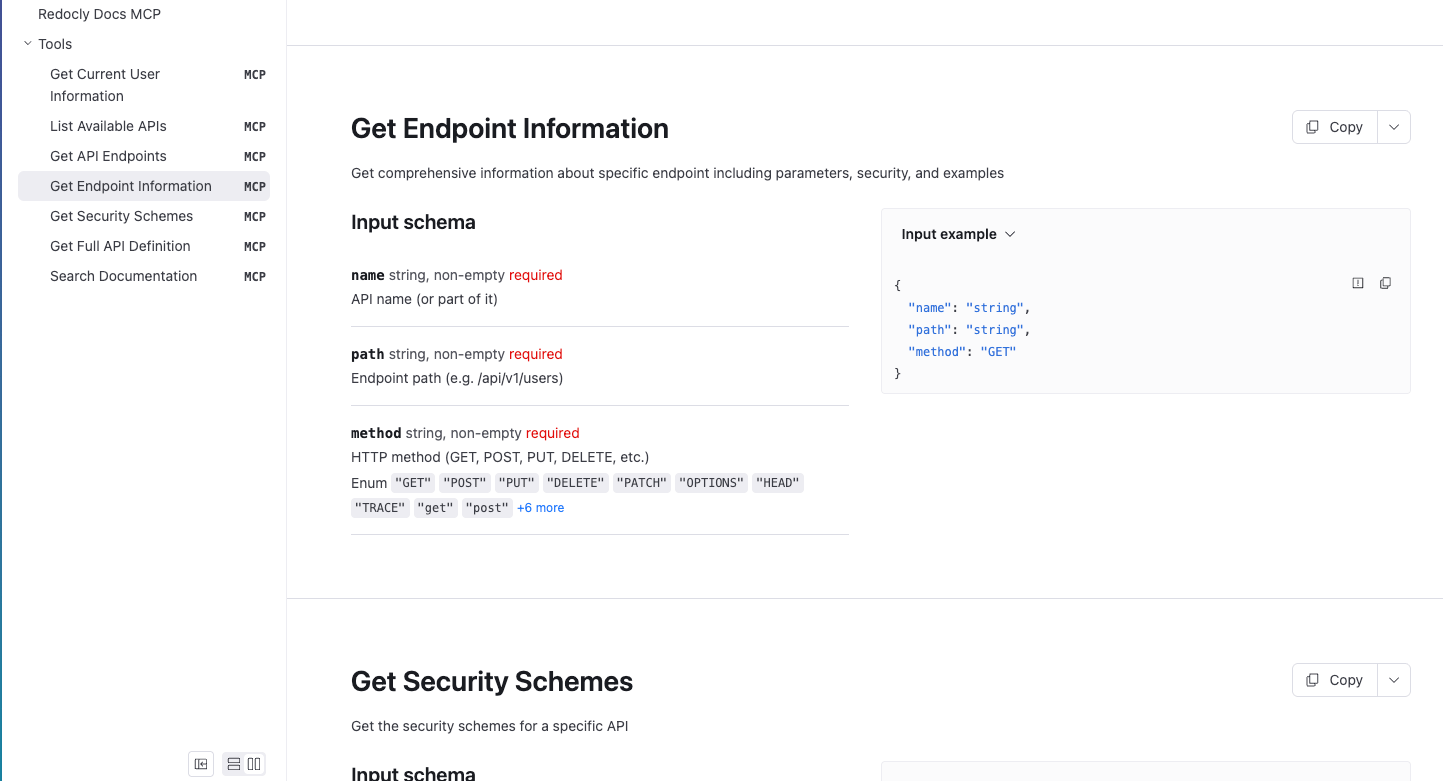
The following example hides the DELETE /clients/{clientId} operation from the MCP server. AI clients still get the GET operation.
paths:
  /clients/{clientId}:
    parameters:
      - name: clientId
        in: path
        required: true
        schema:
          type: string
    get:
      summary: Get a client
      operationId: getClient
      responses:
        '200':
          description: Successful response
    delete:
      summary: Delete a client
      operationId: deleteClient
      responses:
        '204':
          description: Deleted
      x-mcp:
        docs:
          hide: true
- Supported OpenAPI extensions - Complete list of all OpenAPI extensions supported by Redocly for enhanced API documentation