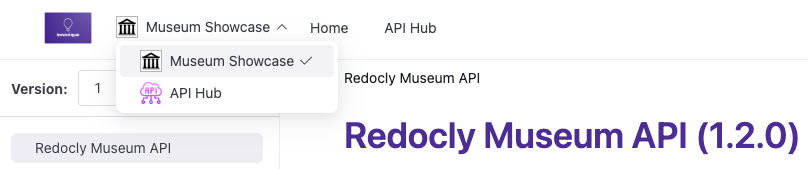
Use the products section to set up multiple product documentation sets in your project. This option configuration creates a product picker in the navbar and offers the ability to customize the look of each product's documentation set.
| Option | Type | Description |
|---|---|---|
| products | Map[string, Product] | REQUIRED. Map of strings allows for the definition of multiple products. Strings represent product only in configuration file - they do not appear in published product. Example: acme-us. |
| Option | Type | Description |
|---|---|---|
| name | string | REQUIRED. Name of the product that appears in product picker. Example: Acme. |
| icon | string | Path to the product icon file. Displays next to the product name in product picker. |
| folder | string | REQUIRED. Path to the product content folder. Cannot be a subfolder in another product's folder. |
The following example shows a simple multi-product configuration:
products:
  acme:
    name: Acme
    folder: products/acme/
  museum:
    name: Museum
    folder: products/museum/
The following example shows a comprehensive multi-product setup with icons and proper folder structure:
products:
  platform:
    name: The Redocly API
    icon: images/platform-icon.svg
    folder: products/platform/
  mobile:
    name: Mobile SDK
    icon: images/mobile-icon.svg
    folder: products/mobile/
  integrations:
    name: Integrations
    icon: images/integrations-icon.svg
    folder: products/integrations/
This configuration creates a product picker in the navbar and organizes content as follows:
project/├──images/│ ├──platform-icon.svg│ ├──mobile-icon.svg│ └──integrations-icon.svg├──products/│ ├──platform/│ │ ├──index.md│ │ ├──api-reference.yaml│ │ └──redocly.yaml # Optional product-specific config│ ├──mobile/│ │ ├──index.md│ │ ├──guides/│ │ └──sidebars.yaml # Product-specific navigation│ └──integrations/│ ├──index.md│ └──webhooks.yaml├──index.md # Project landing page└──redocly.yaml # Main configurationEach product folder can include its own redocly.yaml file to customize that product's documentation. Product-specific configurations override the root configuration for:
- breadcrumbs
- codeSnippet
- feedback
- footer
- logo
- navbar
- sidebar
- search
- mockServer
# Platform-specific customization
navbar:
  items:
    - page: index.md
      label: The platform Overview
    - page: api-reference.yaml
      label: API Reference
    - page: guides/index.md
      label: The platform Guides

footer:
  copyrightText: "© 2024 the platform Team. All rights reserved."
When users search from a product page, results are automatically filtered to that product. Users can remove the filter to search all content.
To hide the product picker globally:
- Add the following code to the
@theme/styles.css:
[data-component-name="Product/ProductPicker"] {
  display: none;
}
- Multi-product - Conceptual guide to multi-product documentation including product switching and organization strategies
- Build navigation - Configure navigation elements and structures for multi-product sites with product-specific navigation
- Style products individually - Add custom styling to individual products